

Software for another receiver
Screenshots are being added: so far 1 from the receiver and 4 from the web interface; the aim is at least 5 of each, with arrows and frames, and, where a setting changes what you see, a before and after comparison.
English screenshots coming: some of the pictures below still show the receiver and the web interface in Romanian. The rows, keys and steps described on this page are the English ones.
What it is for
The HD Satelit image is made for a single receiver model, currently the Amiko Viper 4K V20. Similar receivers (for example the Viper 4K V30 or V40) have a different board or a different memory layout, and an image made for another receiver can damage them.
That is why the image checks that this is the right receiver every time it starts, before anything else: the processor, the board, the memory layout and the board type. The values are only read. Nothing is written for this check.
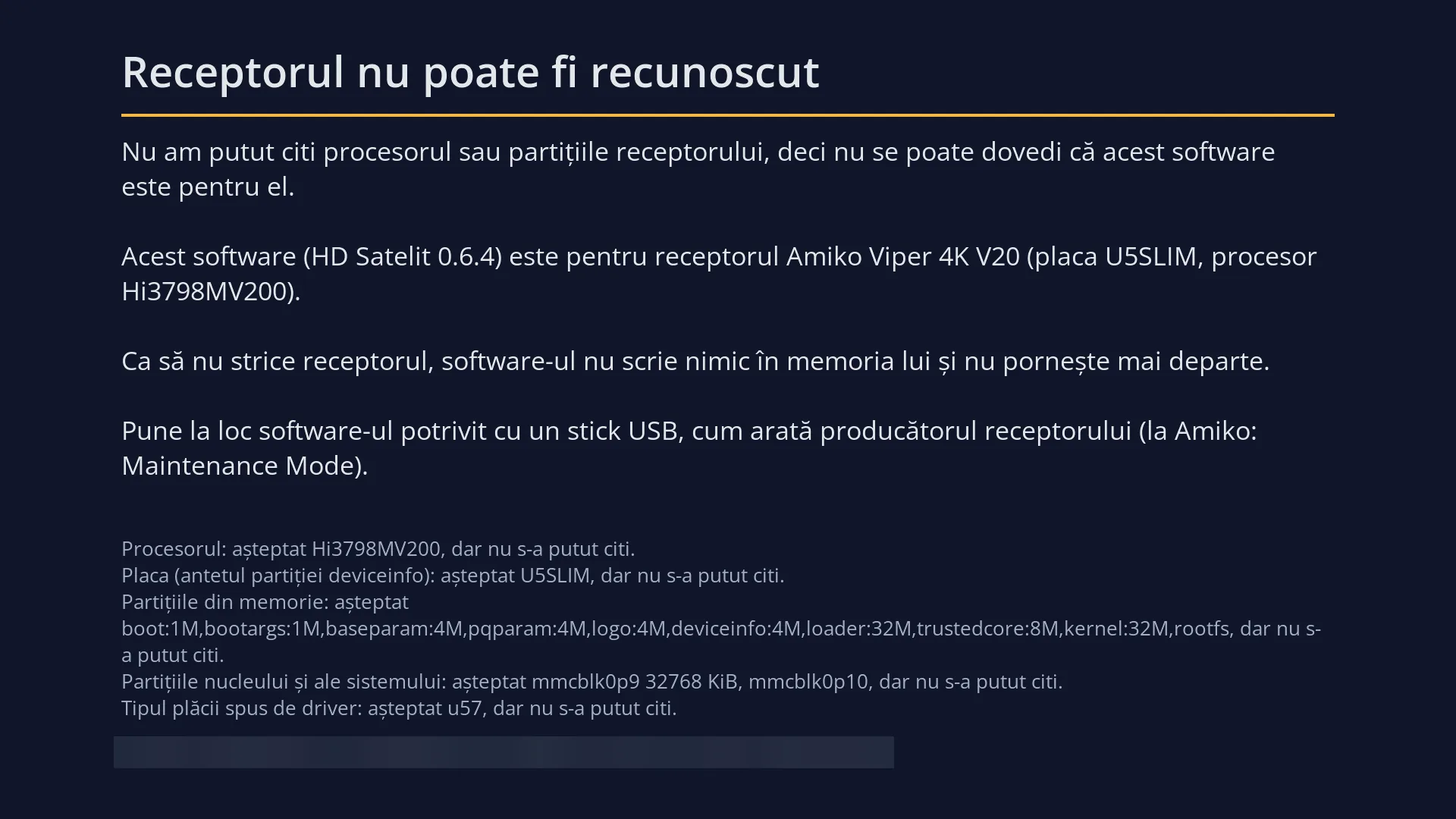
On another receiver, the image writes nothing to its memory and does not continue starting up: it restores no backup and starts neither the setup wizard nor live TV. Instead of the interface, you only see the “Software for another receiver” screen. It tells you which receiver the software is for, which receiver you have and what you can do. When the receiver's data cannot be read at all, the title is “The receiver cannot be recognized” and the image stops in the same way.
The same guard works in “New image from USB stick” (MENU 6 8 2): a package made for another receiver, or without the receiver mark, is not written, and the “The package is not written” window tells you why.
This is not a setting: you cannot turn it off and it has no menu entry. On the right receiver you see nothing of it.
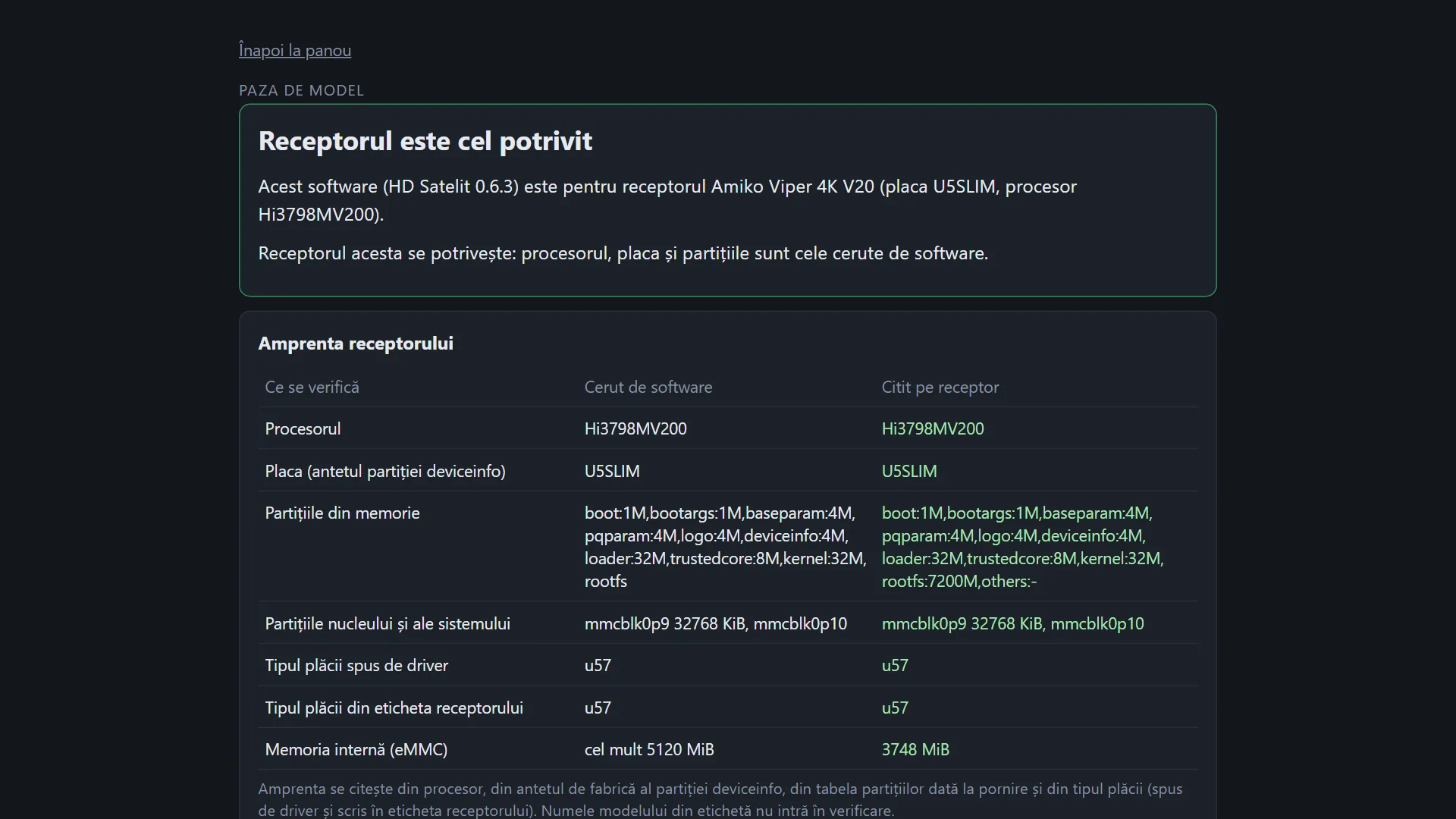
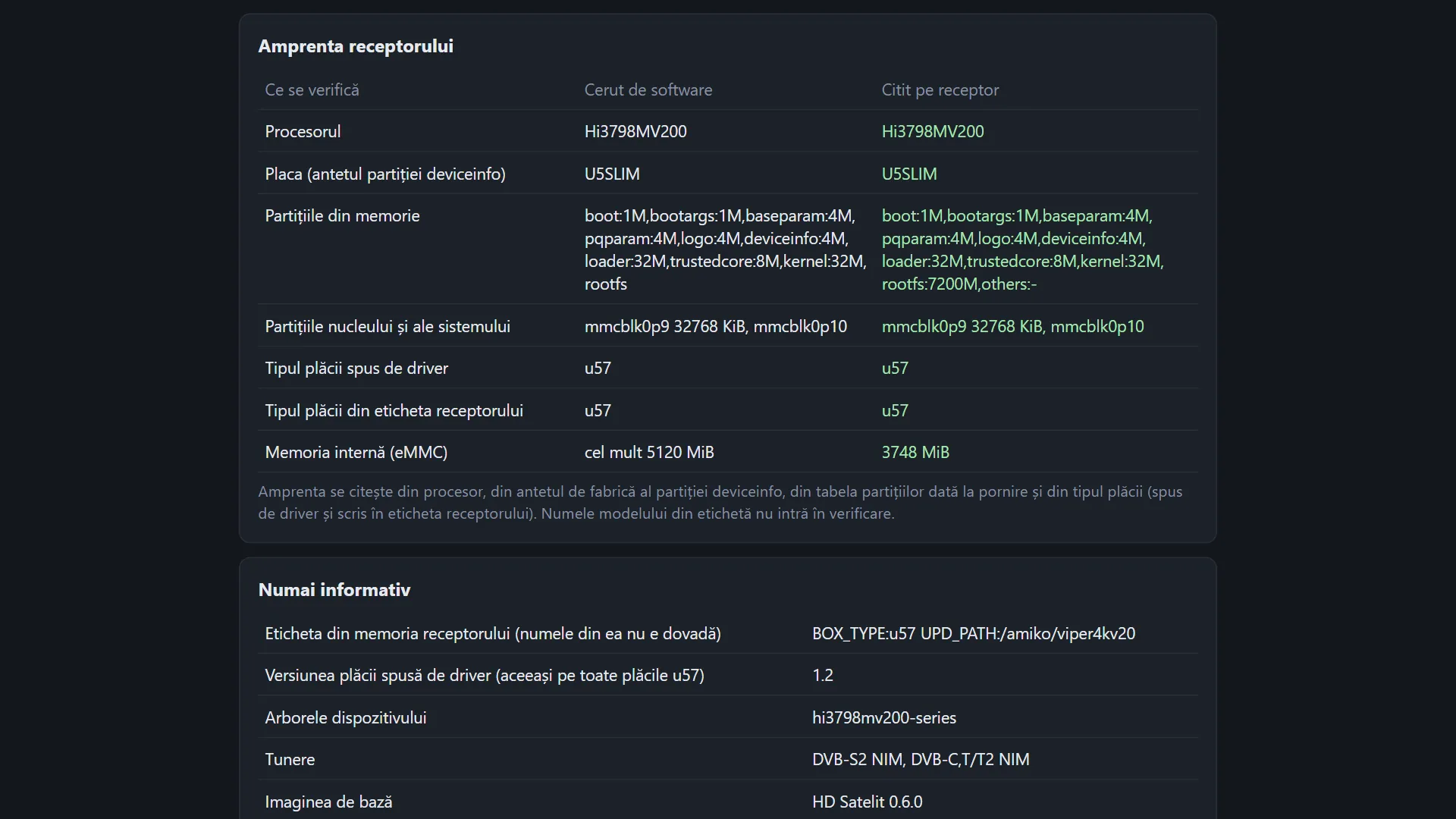
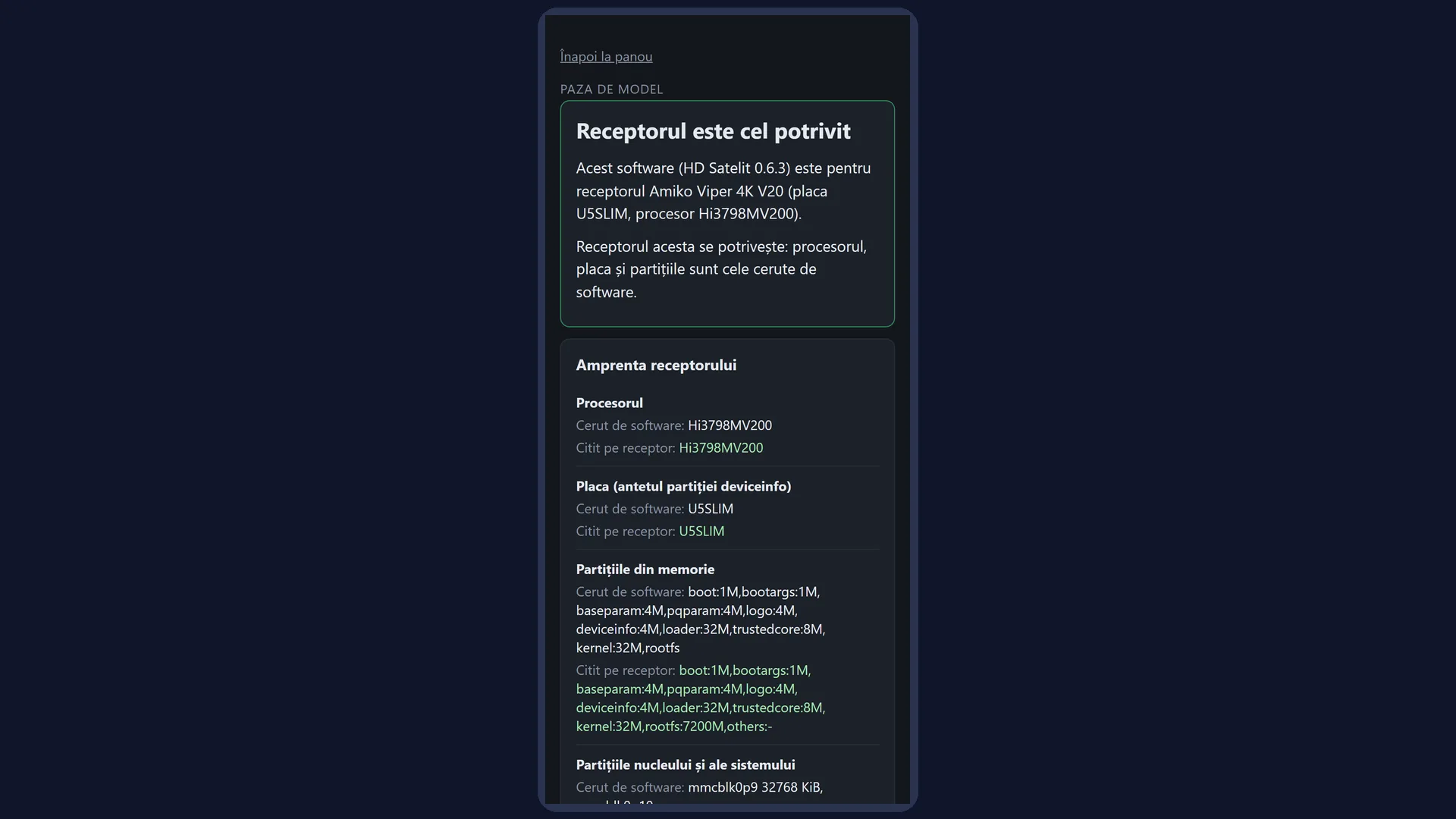
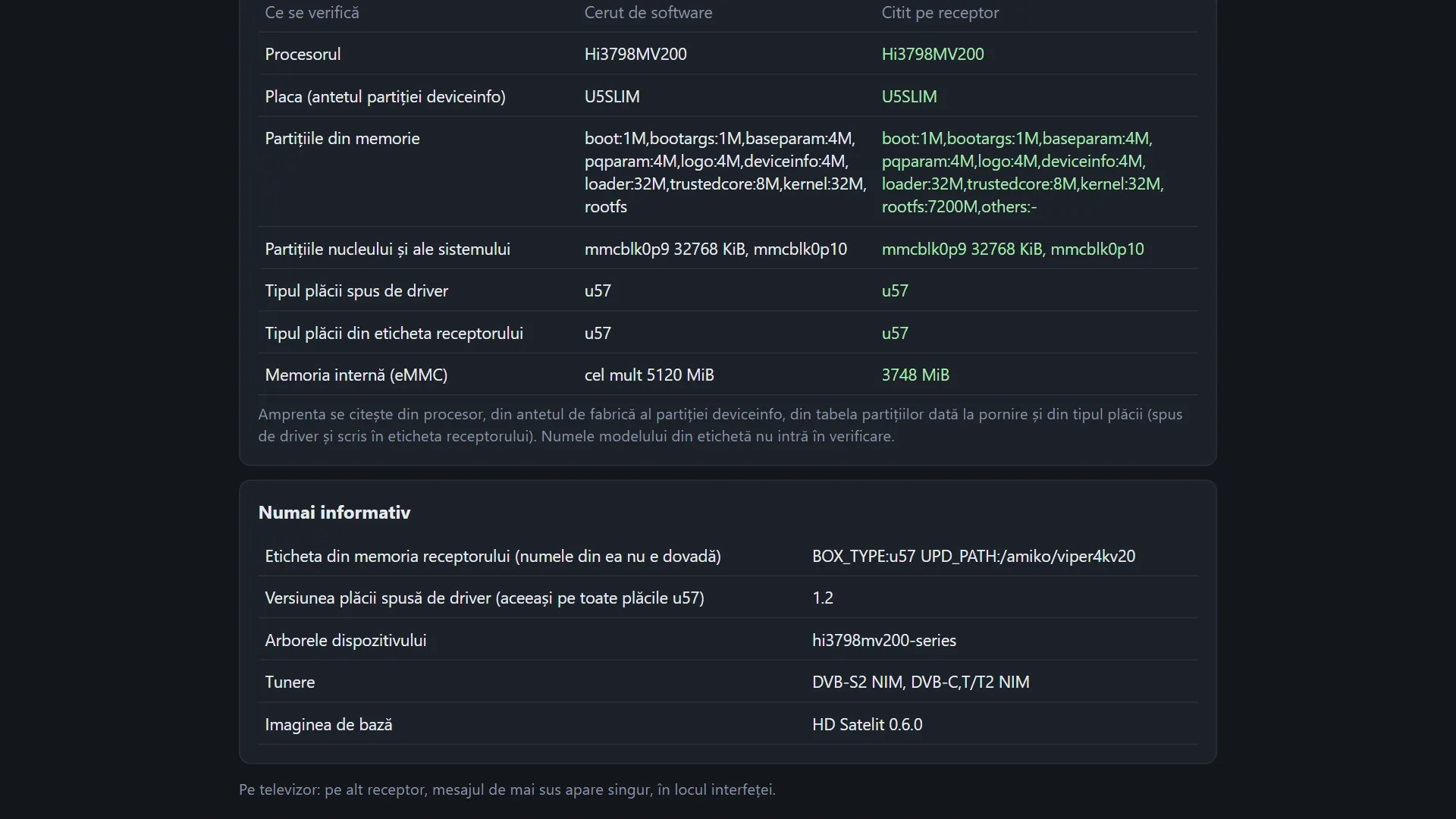
The web page /paza-model shows the same message and, on any receiver, the values read compared with those the software requires.
How to get here
Path: there is no menu entry. The screen appears by itself at startup, only on a receiver other than the one the image is made for.
Package refusal: Main menu > Settings > Software & Firmware > New image from USB stick (MENU 6 8 2), OK on a package that starts with “not written”.
In the web interface: the /paza-model page, from your home network, without pairing the browser. On another receiver, the first page of the web interface (the receiver's address with nothing after it) also shows this message instead of the panel.
What you see on the screen
The full screen, on a dark background. At the top, the large title “Software for another receiver” (or “The receiver cannot be recognized”), with a yellow line underneath.
Plain sentences, one after another: “This software (HD Satelit 0.6.0) is for the Amiko Viper 4K V20 receiver (board …, processor …).”, then “Your receiver: …, board …, processor ….”, “So as not to damage the receiver, the software writes nothing to its memory and does not start any further.” and “Put the right software back with a USB stick, as the receiver's manufacturer describes (on Amiko: Maintenance Mode).”.
The name of your receiver comes from the label that the previous image left in memory, for example “Amiko Viper 4K V40” or “a u571 receiver (for example Amiko Viper 4K V40)”. When it is not known, it says “unknown model”.
Further down, in smaller letters, there is one line for each thing that does not match, for example “Processor: expected …, found ….” or “…: expected …, but it could not be read.”. When the label does not name an Amiko model, the line “Label in the receiver's memory: …” also appears.
At the bottom: “The same message is also shown in the receiver's web interface: http://192.168.1.50/paza-model” (with your receiver's address). While the receiver does not yet have a network address, it says “… on the /paza-model page.”, and the address is looked up again every few seconds.
The “The package is not written” window (in “New image from USB stick”): at the top, why it is not written, for example “This package (HD Satelit …) is for the … receiver.” and “Your receiver: ….”, then “Nothing was written to the receiver.”; in smaller letters, the lines that do not match; at the bottom, “OK or EXIT closes the window.”.
Rows and settings
| Row | Values | Default | What it does |
|---|---|---|---|
| Processor | expected …, found …, could not be read | The chip version, read by the driver from the processor. It must be the one the image requires. | |
| Board (header of the deviceinfo partition) | expected …, found …, could not be read | The board name, written at the factory in an area of the receiver's memory. Nothing else is kept from that area: the network address written there is not stored anywhere. | |
| Partitions in memory | at position N expected …, found … | The layout of the internal memory, given by the receiver's bootloader at startup: the name and size of each part. The screen shows only the first position that does not match. | |
| Kernel and system partitions | expected …, found … | The position and size of the kernel part, and the position of the image's system part. | |
| Board type reported by the driver | expected …, found … | The board type reported by the image's driver. | |
| Board type in the receiver label | expected …, found …, missing (not checked) | The label left in memory by the image that ran before, with its board type. On a receiver of another type, the first time the HD Satelit image starts, the label still belongs to that receiver: a type that is present and different stops the image. A missing label decides nothing, and the model name in it is not proof (it is only shown). | |
| Unconfirmed model: software for testers | Only for a new model not yet tested on a real receiver: there, only the processor, the board type and the position of the kernel and system decide, while the board, the memory layout and the kernel size only give a warning. The interface starts and shows a note with the values that differ. The image for the Amiko Viper 4K V20 is for a confirmed model, so the note does not appear. | ||
| Package refusal (New image from USB stick) | not written: for another receiver, not written: no receiver mark, not written: the package mark is damaged, not written: package damaged or changed, not written: the receiver cannot be checked | A package on the USB stick carries the mark of the receiver it is made for. The mark is compared with the receiver before any writing, then once more just before writing, together with the checksums of the files. Any mismatch stops the writing and opens the “The package is not written” window. |
Keys
| OK, EXIT | On the full screen they do nothing: the screen does not close, and the image does not continue starting up on another receiver. |
| POWER | Short press: standby (or power off, depending on its setting). Long press: whatever its setting says, as on a TV. |
| OK or EXIT (“The package is not written” window) | Closes the window. The “New image from USB stick” screen stays open, with the refusal shown at the top. |
Step by step
You have put the image on another receiver
- Read on the screen which receiver the software is for and which receiver you have.
- If you see nothing on the TV, open the receiver's web interface from your phone: the first page shows the same message, and so does /paza-model (you can find the receiver's address in your router).
- Restore the right software for your receiver from a USB stick, as its manufacturer describes (for Amiko: Maintenance Mode, with GREEN when the display shows MENU). The HD Satelit image has written nothing to the receiver's memory since it started.
You check that your receiver is the right one
- Open the /paza-model page in the web interface.
- At the top it must say “This is the right receiver”, and in the “Receiver fingerprint” table all the values read are green.
A package is refused in “New image from USB stick”
- Press OK on the package and read the “The package is not written” window.
- For “for another receiver”: get the archive made for the Amiko Viper 4K V20.
- For “no receiver mark”: install the image with GREEN at MENU, as in the installation steps on the website.
Problems and solutions
Nothing appears on the TV, or the remote does not respond, on a receiver where you have put the image.
On another receiver, the image starts the part that sends the picture over HDMI only if it knows it writes nothing. Otherwise the message is only in the web interface. Open the receiver's address (from your router) on your phone, read the message, then restore the right software from a USB stick.
“The receiver cannot be recognized” appears on an Amiko Viper 4K V20.
The receiver's data could not be read at startup, and the image takes no risk. Unplug the receiver for a few seconds and switch it on again. If the message remains, write the image again from the USB stick, with GREEN at MENU, and look at the technical lines on /paza-model.
OK and EXIT do not close the “Software for another receiver” screen.
That is by design: on another receiver the image does not continue starting up. Use POWER to put the receiver in standby or switch it off.
/paza-model shows “Read now, after startup:” with different values.
The decision was made at startup. Something now reads differently (for example a driver that has stopped). Restart the receiver fully (MENU 7 4).
/paza-model says “The model guard does not apply here”.
The running software has no receiver mark (for example the image started as a test on a computer), so nothing is checked. It does not appear on a receiver with the HD Satelit image.
A package shows “not written: for another receiver”.
The “The package is not written” window tells you which receiver the package is for. Get the archive for the Amiko Viper 4K V20 and check the SHA-256 checksum on the website.
Related topics
- New image from USB stick
- Installation steps for the Amiko Viper 4K V20: /receptoare/amiko-viper-4k-v20/descarca/
- Device & Hardware (the recovery folder on the USB stick)
- Restart Box
- Settings copy
- Companion web page: /paza-model.