

The HD Satelit 0.7.5 update
15 November 2026
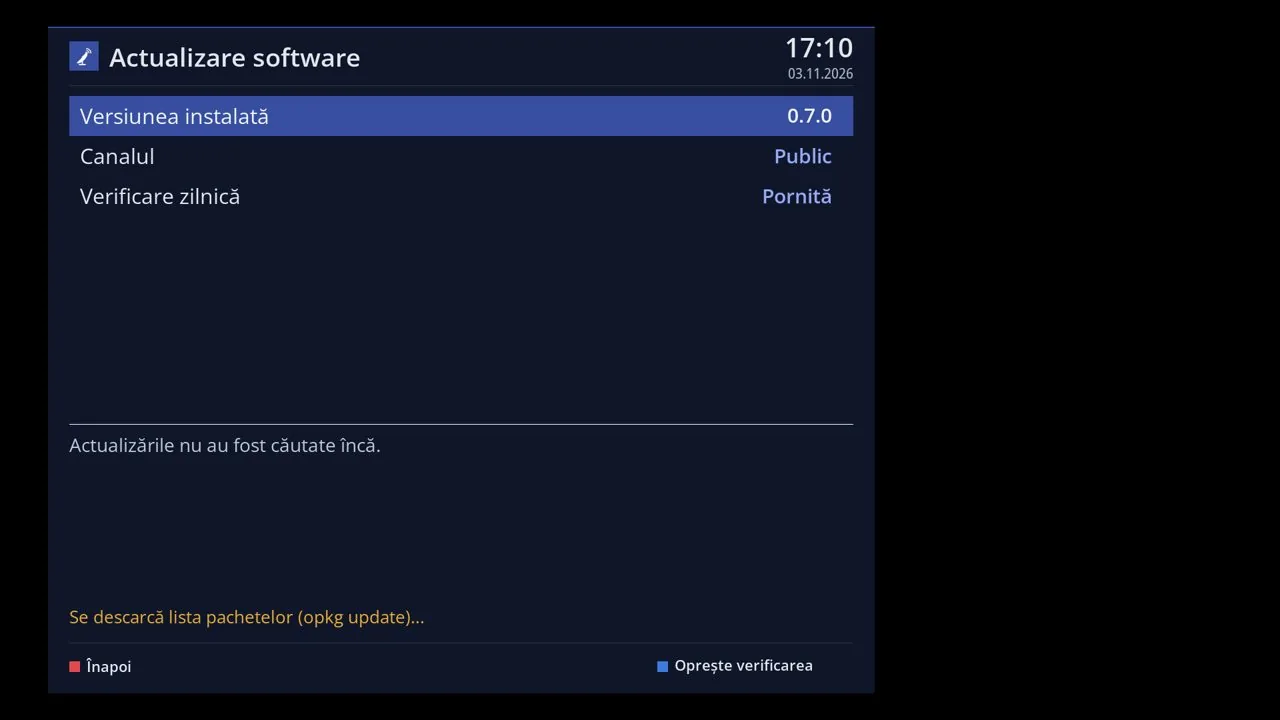
Version 0.7.5 comes as an update from Menu > Settings > Software & Firmware > Software update, on all receivers with HD Satelit 0.7.0 or newer. Channels, settings and plugins stay. On 0.7.0, 0.7.1 and 0.7.2, the receiver may ask on its own whether to do a fresh install from scratch. There is no need: choose "Not now", and the menu update brings the same version while keeping settings and plugins. The full 0.7.5 firmware packages are available on the website for 12 receivers: Amiko Viper 4K V10, Amiko Viper 4K V20, Amiko Viper 4K V30, Amiko Viper 4K V40, Octagon SF8008 4K UHD, Octagon SF8008 MINI 4K, GigaBlue UHD TRIO 4K, Uclan Ustym 4K PRO, Vu+ Solo4K, Vu+ Uno4K SE, Vu+ Duo4K, Vu+ Solo SE.
The Applications menu, in the Main menu: YouTube for TV, the browser and the HD Satelit and SatBase websites, started with OK. Search the menu is the first row on every menu page and finds any menu or setting by name; the same search is also at the top of the web interface. Tuners and scanning is now also in Settings, with Tuner settings, Channel scan and Dish alignment and setup, as on other receivers; the old paths still work. Large list, an option in Channel list layout: the list fills the screen, with the channel picture and the guide on the right; the usual list stays the default. Screensaver of your choice: ten designs, Automatic or One by one, with a preview and a full-screen test, on the TV and in the web interface. Text size in the channel list is set separately from the rows, and the Power & Restart menu is the last one in the Main menu. The web interface has the menu across the top, in the same order as on the receiver, with submenus; on a phone it fits on one line. The web interface home page shows the receiver's screen only while it is open, refreshed every 1 to 10 seconds as you choose, or not at all. Themes can be deleted from the theme list, on the TV and in the web interface, even the one in use or an incomplete one; the HD Satelit theme always stays.
Movies and TV series from your IPTV account: posters, Continue watching, Favorites, Recently added, a page for each movie and series, and search, also in the web interface. IPTV: a TV guide for internet channels, automatic reconnection of a stopped channel, past programmes, account status and parental control by group. Find real 4K channels shows what each IPTV channel named 4K really sends, and internet channels with HDR switch the video output to HDR on their own. Channels that send only sound, including internet ones, show the radio screen instead of a black screen. IPTV: EXIT in a country goes back to the country list, and the internet channel you watched last starts again after the interface restarts.
A scan adds the Last Scanned bouquet, with the channels it found, at the end of the bouquet list; you can turn it off in the settings and in the web interface. Satellite feed plugins, such as LiveFeed and Satelliweb, open the signal finder on the chosen transponder again. Mediaset channels on 9.0°E broadcast via T2-MI, such as Rete4 HD, start directly from the channel list. DVB-T2, T2-MI and DAB+ channels from channel lists made for other receivers start when you zap to them, with nothing to set up. Dish motor: the location is shown in words, the dish no longer turns towards satellites below the horizon, and on Octagon SF8008 the signal locks right after turning. Names assigned by the receiver, such as countries, multiplexes, and DVB-T2 and DAB+ bouquets, appear in the menu language, not in Romanian. With no signal, level and quality show 0 everywhere: in the infobar, in the list, in the signal finder and in the web interface.
Disk mounting: choose where each disk or stick is mounted, for example hdd or usb, remove it safely and mount it again, on the TV and in the web interface. Choose where to store the TV guide, in internal memory or on a stick or disk; if the stick is missing, the guide stays in internal memory. VPN: the provider's servers by country, with a country list, plus Restart the VPN and Test the speed, on the TV and in the web interface. HDMI CEC: the setting Standby when the TV switches to another source puts the receiver in standby after one minute; it is off by default. Multiboot also works on Qviart DUAL 4K and GigaBlue UHD Quad 4K Pro, and with the receiver started from internal memory you can also choose the systems on disk. Subtitles no longer start on their own by default, as on other receivers, and the SUBT key remembers on each channel whether you turned them off or on. With 4K selected, text is no longer blurry after the TV is turned on, and the wizard offers 4K at 25 or 30 Hz when the TV has no 4K at 50 or 60 Hz. The USB stick check before installing from the stick has a time limit, shows the elapsed time and stops cleanly with EXIT or from the web interface.
Themes whose font lacks the letters of a language, such as Ukrainian, take them from the fallback font instead of showing dots. Plugins that bring their own fonts, such as OAWeather, no longer crash, and a satellite list you put in the settings folder takes priority. HbbTV: apps that needed missing features, such as the TVP one, no longer crash, and those that need WebAssembly start as well. Plugins see the real system version also after updates from the menu, not the one from the first installation. The full firmware from the website already has the languages, subtitle text recognition and the stick drivers; only receivers with small internal memory, such as Vu+ Solo SE, get them from the feed. The interface responds right after startup even with tens of thousands of channels, and the Channels page of the web interface opens the second time in two seconds. We fixed a few more errors in the conditional access modules.