

Update 0.6.10 of the HD Satelit image
29 October 2026
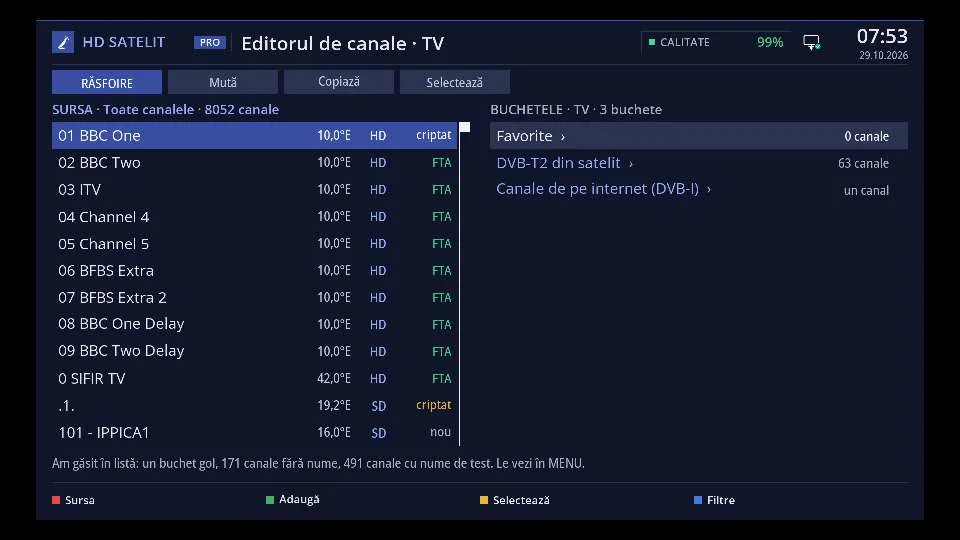
Receivers with HD Satelit image 0.6.0 or a later update get version 0.6.10 from the menu, under Software update, without a USB stick.
New: the channel editor, in Menu > Scan > Channel editor and in the web interface. You move, copy, rename, hide and delete channels and bouquets, with undo, a backup and the list of changes before saving. In the web interface it also has an advanced mode, with the transponders, the channel logos and a check of the list.
Also new: the forum of your receiver, on the receiver and in the web interface, translated into your language. As a beta tester you write posts and add screenshots: the screenshot button saves the screen to a USB stick or to the receiver's memory, and the screenshot gallery opens directly when you add a picture. The Beta tester menu has a new look, and remote assistance is now requested from the tester menu.
If the receiver does not start, it sends an anonymous technical report by itself, with no personal data, and shows its code on the front display, while the diagnostic screen shows the error code. In Settings > System & Devices > Logs of the other slots you send, with one press, what the other slots left behind after a failed start.
Receiver password, in Settings > Network & Internet and in the web interface: you choose the password for SSH and SFTP and see it there at any time. With the password you get in only from your home network, with an SSH key from anywhere. The FTP server comes with the next image.
Also: a short press of GREEN opens Extensions and applications, the blue button opens the list of bouquets, with Favourites in the menu language, DVB subtitles read as text are always translated, and DVB-T2 over satellite also knows the Spanish feeds on 30W. On Octagon and on the first Amiko Viper 4K V10 the remote buttons, the full screen picture, the SATA disk and the signal quality bar work. The source code of version 0.6.10 is public.